Text
A single-line input field for entering short text. Commonly used for titles, names, or short descriptions.
Screenshots
Field render in form:

Field render in form:

Field render in field group:
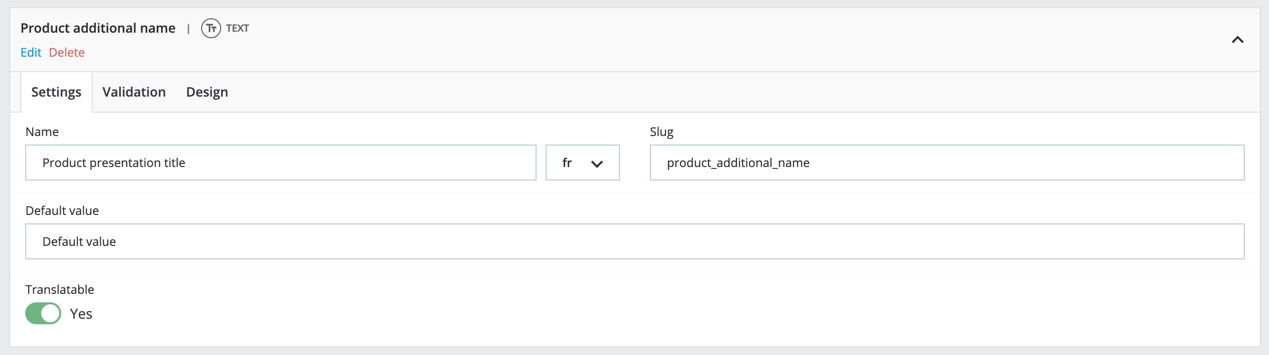
Configuration
-
Settings:
- Name: The label for the field.
- Slug: The unique technical identifier.
- Default value: Default value for the field.
- Translatable: Determines if the field content can be translated into multiple languages
-
Validation:
- Require: Determines if the field must be filled out.
- Min length: The minimum number of characters allowed.
- Max length: The maximum number of characters allowed.
-
Design:
- Instructions: Text displayed alongside the field providing details about the data needed.
- Width: The width of the field in the form.
- Classes: Custom CSS classes for styling the field.
- ID: Custom ID attribute for the field.
- Text before: Additional text displayed before the field.
- Text after: Additional text displayed after the field.
Return format
- Type: string or null
- Note: If the field is translatable, the field return a single string depending of the context language.
Usage
/some-template.tpl
{* Object or Entity and Id *}
{assign var="data" value=$modules.customfieldgroups.data->get($product)}
{assign var="data" value=$modules.customfieldgroups.data->get('product', $product.id)}

<span>
  {$data.field_group_slug.field_slug}
</span>
/SomeClass.php
function someMethod()
{
    $dataRetriever = DataRetrieverFacade::getInstance();

    $data = $dataRetriever->get($object);               // Object
    $data = $dataRetriever->get('product', $idProduct); // Entity and id

    $value = $data['field_group_slug']['field_slug'];
}